
Planning a raised bed doesn’t have to be complicated. This free square foot gardening planner helps you design a clear, efficient garden layout before you plant, so you know exactly what to grow, where to place it, and how much space each plant needs.
Whether you’re working with a small raised bed, a backyard garden, or containers, this tool is designed to make square foot gardening simple and practical, even if you’re a complete beginner.
Square foot gardening is all about dividing your garden bed into equal sections and planting crops based on their spacing needs. When it’s done right, it saves space, reduces waste, and makes garden care much easier.
This planner helps you apply those principles visually, without guesswork.
How to Use the Garden Planner (6 Steps)
My square foot gardening planner is designed to be straightforward yet powerful. Here’s how to get started:
1. Build Your Garden Grid
Begin by setting up your garden’s layout. Choose a grid size that matches your space. Popular options include 4×4 or 3×6, but you can customize it to fit any area, from a small 2×2 plot to a larger 5×10 bed. The planner’s flexible grid system adapts to your unique setup.
2. Pick Your Plants
Browse a curated selection of vegetables, herbs, and flowers, each with a colorful icon and specific planting guidelines. Want to grow carrots, basil, or zinnias? Just click to select a plant and place it in a grid square. The planner makes it easy to visualize your choices.
3. Embrace Smart Companion Planting
Some plants are best friends, while others don’t get along. For example, planting garlic near peas can stunt their growth. My planner uses custom-built logic to alert you with a pop-up warning if you try to place incompatible plants together, ensuring a harmonious garden.
4. Manage Space for Big Plants
Crops like cucumbers or melons need room to sprawl. It automatically reserves extra space for these plants, preventing overcrowding and promoting healthy development.
5. Edit and Refine
Made a mistake or want to try a new layout? Switch to “Erase Mode“. The grid updates instantly, and now you can remove vegetables one by one by clicking on them. You want to reset the whole plan? Click on “Clear” and the planner will restart completely. All this lets you experiment until your plan feels just right.
6. Save Your Plan
When your design is ready, export it as an image by clicking on “Download Plan” to get it in JPG or clicking “High-Res” to get it in PNG. Print it out to hang near your garden or save it on your phone for quick reference while you work.
What Is Square Foot Gardening?
Square foot gardening is a method where you divide your raised bed into 1×1-foot squares and assign plants to each square based on how much room they need to grow.
Instead of planting in long rows, you focus on:
- Plant spacing
- Efficient layouts
- Maximizing harvests in small spaces
This method works especially well for:
- Raised beds
- Small backyard gardens
- Beginner gardeners
- Urban and container gardens
If you’re new to the concept, you may also want to read our guide on square foot gardening basics and raised bed gardening for beginners.
Is This Planner Good for Beginners?
Yes, this tool was created specifically for beginners and home gardeners.
You don’t need:
- Gardening experience
- Technical knowledge
- Perfect measurements
The goal is to give you a clear visual plan so you can plant with confidence instead of guessing.
If you’re just starting, you may also enjoy our full vegetable gardening for beginners guide.
What Makes My Square Foot Gardening Planner Special?
Inspired by Mel Bartholomew’s square foot gardening method, my square foot gardening planner takes the concept of dividing garden beds into 1×1-foot squares and elevates it with a custom-built, user-friendly interface. Each square is carefully assigned plants based on their growth needs, ensuring you make the most of every inch of soil.
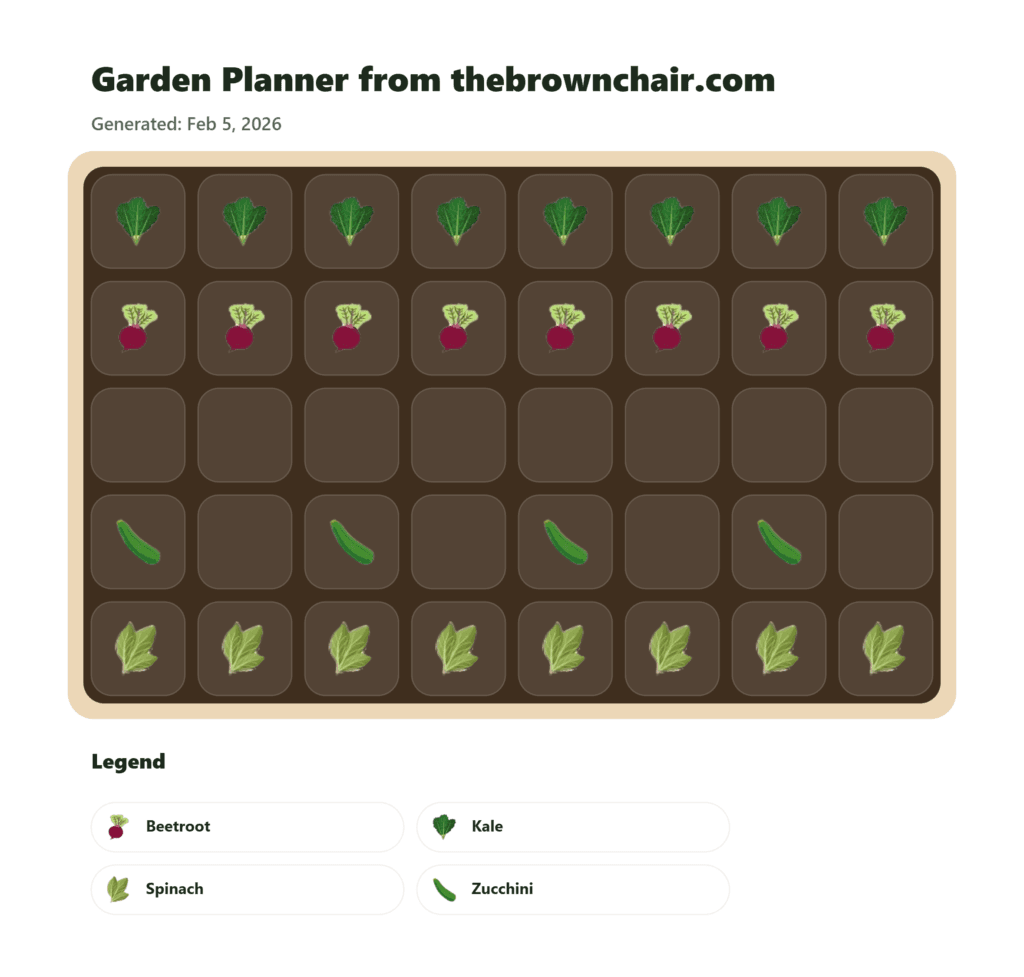
Unlike generic gardening apps, my tool was crafted from scratch to offer a tailored experience, blending intuitive design with practical gardening wisdom.
This planner isn’t just about plotting plants, it’s about empowering you to grow efficiently, avoid common mistakes, and enjoy the process. Whether you’re cultivating tomatoes on a patio or herbs in a community garden, my tool helps you plan with precision.
How This Square Foot Gardening Planner Works
This planner lets you visually map out your garden before planting. You choose the size of your bed, divide it into squares, and place crops based on recommended spacing.
With this tool, you can:
- Plan raised bed layouts without measuring every plant
- Avoid overcrowding and wasted space
- See how many plants actually fit in a bed
- Adjust layouts before planting anything in the soil
It’s especially useful if you’re unsure about plant spacing, companion planting, or how many vegetables your bed can realistically support.
Why Use My Planner?
It stands out for its simplicity and effectiveness. Here’s why gardeners love it:
- Maximizes Small Spaces: Perfect for urban gardens, raised beds, or even container setups.
- Prevents Plant Clashes: Guides you to pair compatible plants for healthier growth.
- Saves Time and Effort: Create and tweak layouts in minutes, not hours.
- Accessible Anywhere: Download or print your plan to keep it handy while you plant.
- Free and Intuitive: No steep learning curve, even for beginners.
With these features, my planner transforms gardening from a chore into a rewarding, creative process.
Why Planning Your Garden Layout Matters
Poor spacing is one of the most common mistakes in home gardens. When plants are too close together, they compete for:
- Light
- Water
- Nutrients
- Airflow
This often leads to:
- Smaller harvests
- More pests and diseases
- Weak or leggy plants
Using a square foot gardening layout helps prevent these problems by giving each plant the room it needs from the start.
Standout Features of My Planner
It was crafted to solve real gardening challenges. Here’s what sets it apart:
- Custom Companion Logic: Warns you about poor plant pairings, like tomatoes near potatoes, to avoid growth issues.
- Smart Spacing: Automatically allocates space for large crops, ensuring they thrive.
- Flexible Design: Adjust your grid to fit any garden size or shape.
- Portable Plans: Export your layout for easy access, whether you’re online or knee-deep in soil.
These features make my planner a must-have for anyone looking to grow smarter, not harder.
Who Should Use My Planner?
My square foot gardening planner is built for a wide range of gardeners:
- City Dwellers: Turn small spaces like balconies or rooftops into productive gardens.
- Newbies: Learn gardening basics with a tool that guides you every step of the way.
- Families and Teachers: Engage kids with a fun, visual way to learn about plants.
- Seasoned Growers: Streamline complex layouts with precision and ease.
No matter your skill level or space constraints, this planner helps you grow with confidence.
What Can You Grow With Square Foot Gardening?
Square foot gardening works best for:
- Leafy greens (lettuce, spinach, arugula, kale)
- Herbs (basil, parsley, cilantro)
- Root vegetables (radishes, carrots, beets)
- Compact fruiting crops (bush beans, peppers)
Some larger plants, like tomatoes or squash, may need multiple squares or vertical support. For detailed crop-specific advice, explore our individual growing guides, such as:
Tips for Getting the Most Out of Your Planner
To make your gardening experience even better, try these practical tips:
- Start Small: Begin with a 4×4 grid and a few crops, like lettuce and radishes, to get the hang of it.
- Group by Needs: Place plants with similar sunlight or water needs together for easier care.
- Use Visuals: Lean on the planner’s icons to keep your layout clear and organized.
- Keep It Handy: Print your plan and keep it near your garden for quick checks.
- Rotate Crops: Use the planner to shift crops each season, keeping your soil healthy.
Avoid These Common Plant Pairing Mistakes
My planner catches most errors, but it’s helpful to know these common plant conflicts:
- Peas and Garlic/Onions: Alliums can slow pea growth.
- Tomatoes and Corn/Potatoes: These compete for nutrients and attract similar pests.
- Lettuce and Garlic: Garlic can hinder lettuce development.
- Cabbage and Tomatoes/Strawberries: These pairings may lead to disease or poor yields.
With my planner’s alerts, you’ll steer clear of these issues and create a balanced garden.
Square Foot Gardening for Raised Beds
Raised beds are ideal for square foot gardening because they:
- Have defined edges
- Allow better soil control
- Warm up faster in spring
- Drain more efficiently
If you’re still setting up your bed, see our guides on:
- How to build a raised garden bed
- Best soil mix for raised beds
Planning your layout before planting helps you avoid replanting later and keeps your bed productive all season.
Why My Square Foot Gardening Planner Is a Must-Try
We built this square foot gardening planner from scratch to empower gardeners like you.
It’s free, easy to use, and packed with features that make planning a breeze. Whether you’re growing fresh veggies for dinner or teaching kids about nature, my tool helps you design a garden that’s productive and stress-free.
Ready to dig in? With a few clicks, you’ll be on your way to a bountiful harvest.
Common Square Foot Gardening Mistakes to Avoid
Even with a planner, a few mistakes are common:
- Ignoring mature plant size
- Mixing crops with very different water needs
- Overcrowding “just one more plant”
- Forgetting access paths for harvesting
If your plants look crowded or stop producing well, spacing is often the issue. Our thinning and spacing guides can help fix problems early.
Conclusion
A successful garden starts with a good plan. This square foot gardening planner helps you visualize your space, avoid common mistakes, and grow more food with less effort.
Use it alongside our growing guides, soil tips, and spacing articles to build a productive, well-organized garden, one square at a time